Posts

Showing posts with the label SharePointOnline

Tiles modern UI

Image
Back in SharePoint 2013 Microsoft introduced "Promoted links" a feature which enabled users to create tiles quick and easy without any custom code. Since then I've seen Promoted links being used a lot of ways, some better than others. However creating tiles with an image in the background was always a nasty thing to do. People would use the weirdest images as background to indicate what it was, totally not user friendly. Especially the choice of the color was very "weird" you would have tiles with all sort of colors and images (see image below as an example). Promoted links always had one big problem; Scaling! It's not responsive in a way you would want to have it. Since Microsoft introduced Modern UI they have also introduced the webpart "tiles". Tiles enables the user to create custom tiles within their SharePoint site, quick and easy. Cool features of the Tiles webpart. Tiles are responsive! They resize when the screen gets smalle...
Publishing documents in Modern UI

Image
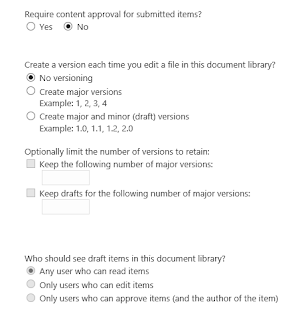
Yesterday at a client I got the question if it's possible to publish documents in Modern UI and if it's possible to only show documents that have been published. In the good old Classic UI days everyone would jump and say "YES, that's possible". However in Modern UI I was a little sceptic. What is possible concerning Publishing and can users only see documents that have been published. Want the short answer? NO, there is no publishing mechanism in Modern UI and NO it's not possible to show documents (default feature) that have been published. Now the long answer. We all know the settings in the classic document library that you need content approval and that users can only see draft items when: - Any user who can read items - Users that have contribute permissions - Users that can approve or the author However in Modern UI these features don't work. Microsoft introduced a "Sign-off" workflow that can be used to approve item...

Content approval ID's

When you have content approval activated on your library and you want to use a workflow, the following statuses are being used. Status ID Approved 0 Rejected 1 Pending 2 Draft 3 Scheduled 4 This makes it easier to use workflows in combination with the content approval. Do keep in mind that when you are to update the metadata of the item you are "approving" once you update the item the status will be put back to "Pending".

System account workaround

We all know the problem that Workflows don't work when an item has been adjusted by the system account (Online it could be called SharePoint App). To workaround this issue you can use Flow  instead of SharePoint Designer. Flow checks every now and then to see if the conditions are met, so Flow doesn't care about the account that has changed it. I used this fix to adjust a field and trigger the workflow that normally wouldn't work because of the system account. It's not the most beautiful solution but hey! It works!

Application Insights Azure portal

Image
So here is the thing. I want to have some analytics on SharePoint online but I don't want to use Google Analytics. I know there is an Office 365 adoption package for PowerBi, been there done that. However I'm missing 1 big feature! That one feature is: User flow User Flow Google Analytics Where do users go when they're on SharePoint? What do they click what pages do they visit? I want to know where the users go in en come out again. Sure with Analytics of Office 365 in the Admin portal or the Adoption package you get a good sense of what is happening in your tenant but you never really know what path they walk. So let's get the grocery shopping list: Data, we need the data. Where do I find the correct data? Ok we need a dashboard, PowerBI Desktop should do the trick We need the Sankey Diagram, that's the diagram Google Analytics also uses Well part 1 is hard to find, I'm not sure if I'm looking in the right spot but I found Application Ins...

Modern UI Office 365

Image
I've been using ModernUI for a while now. I love the way Microsoft made SharePoint so much easier. Remember the time that you had to say click here click here to insert the webpart, now just click "Edit" and press the + sign where you want. Easy as that! The learning curve is getting a whole lot less steep.  I haven't had the chance to give workshops around ModernUI but I'm willing to put this to the test and see if it's intuitive enough. Default feature: The news! The first thing on the ModernUI site you see is the huge grey bar. Ok Microsoft haven't finished this part of the site yet. In the Delve blogs you can adjust it easily but not in ModernUI YET! If you look past the grey bar you see the News webpart and the Site activity, nothing more! The times I had customers saying "we want news on the homepage" well there you go! Clean and once you click on "See all" it shows you even more news in a neat list. It's a smart webpar...