Posts

Tiles modern UI

Image
Back in SharePoint 2013 Microsoft introduced "Promoted links" a feature which enabled users to create tiles quick and easy without any custom code. Since then I've seen Promoted links being used a lot of ways, some better than others. However creating tiles with an image in the background was always a nasty thing to do. People would use the weirdest images as background to indicate what it was, totally not user friendly. Especially the choice of the color was very "weird" you would have tiles with all sort of colors and images (see image below as an example). Promoted links always had one big problem; Scaling! It's not responsive in a way you would want to have it. Since Microsoft introduced Modern UI they have also introduced the webpart "tiles". Tiles enables the user to create custom tiles within their SharePoint site, quick and easy. Cool features of the Tiles webpart. Tiles are responsive! They resize when the screen gets smalle...

Azure AD Password Protection

Image
How often do you see users do the following things: Write their password on a post-it and stick it on their laptop or monitor Add a +1 when they need to reset their password for example they go from P@ssw0rd01 to P@ssw0rd02. That really made it harder. Create a default password like "P@ssw0rd" or "123456789" Yeah they sometimes add a 123 to make it "Difficult" haha Now to be honest now a days you need a lot of passwords to login into all those services on the www. Keeping track of them is a difficult task. Writing them down in a notepad and storing it on your computer is NOT the way to go! To make life easier for them users got "creative". For example they use the company name + a number to keep their password. For example "AcmeCompany123". Once they had to change their password they would make it "AcmeCompany234" As an IT admin preventing the use of these passwords is something that is hard to do. You could train t...

Microsoft Forms GA - New Quiz

Image
In  Microsoft Forms GA - New Forms  I discussed the New Forms functionality and what you can do with it. In part 2 I want to talk about the Quiz functionality of Microsoft New Quiz When creating a new Quiz you get the same layout and options as in the Forms functionality. But there are some differences. Let's talk about the differences in an overview below. Questions As I mentioned the options are the same as in New Forms: Choice Text Rating Date Ranking Likert But in the details there are some more options: Math - You can fill in an equation that the user has to solve. Forms won't calculate the math for you and determine what the answer is. So you have to fill in the answer below the equation.  Points - Let's say you have 100 points to give in the exam, with Points you can determine which questions get how many points.  These points will be shown when the Quiz has been submitted. The user will directly know how many points he/s...

Microsoft Forms GA - New Forms

Image
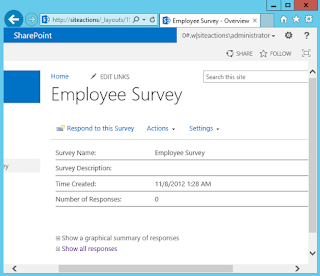
SharePoint Survey Ah yes the good old days when Microsoft had SharePoint surveys. What a "tough" product that was, so complex and so not easy to implement and use. Just recently a client asked if it was possible to create a survey in SharePoint. I said "sure" but what I forgot was that they don't have Microsoft Forms enabled (yet!). So I helped them to get started with SharePoint survey but I soon realized that I had to create the survey myself because it's too complex to sell to the business. So that's what I did, create a survey. I thought about what was wrong with SharePoint survey and how hard it is to create a new survey. I thought about the sharing of the survey with other people and how the permission structure was set-up. I quickly realized I had to introduce them to another tool called Microsoft Forms. Microsoft Forms Released back in 2016 and since a few months Enterprise ready. Microsoft Forms enables users to create for...

Publishing documents in Modern UI

Image
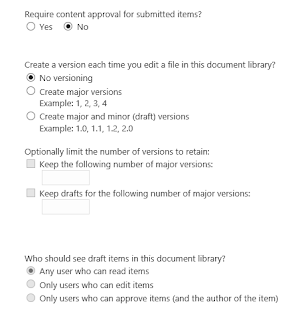
Yesterday at a client I got the question if it's possible to publish documents in Modern UI and if it's possible to only show documents that have been published. In the good old Classic UI days everyone would jump and say "YES, that's possible". However in Modern UI I was a little sceptic. What is possible concerning Publishing and can users only see documents that have been published. Want the short answer? NO, there is no publishing mechanism in Modern UI and NO it's not possible to show documents (default feature) that have been published. Now the long answer. We all know the settings in the classic document library that you need content approval and that users can only see draft items when: - Any user who can read items - Users that have contribute permissions - Users that can approve or the author However in Modern UI these features don't work. Microsoft introduced a "Sign-off" workflow that can be used to approve item...

Hub Sites in Office 365

Wrote a blog for the company I work at Portiva. You can see it here: https://blog.portiva.nl/2018/05/30/hub-sites-in-office-365/ Regards, Alexander

Attack simulator Office 365

Image
Hearing about the attack simulator first I thought back at the time I was in college and somebody actually did a phishing "attack" on the whole school. That got him suspended (for a short period) but it made me aware of how easy it is to "attack" a school or another company. Do you know in your organization who is actually vulnerable for phishing or other forms of attack? Who of your employees does understand that the email is not coming from a trusted organization? Tot test this Microsoft released the "Attack simulator" a pretty cool name for a tool in Office 365. The Attack simulator At this moment it's in preview but if you're in targeted release you can go to Security and compliance center > Threat management > Attack simulator.  Note! you need to activate Multi Factor Authentication (MFA) for this. Activate this first and then log-in again to be able to use the Attack simulator features. Let the games begin You can use a temp...

Keep up with Office 365 with these useful sites

Security  Twitter Microsoft Secure ( @ MSFTsecurity ) Microsoft Azure ( @ Azure ) Microsoft News ( @ MSFTnews ) Windows Defender security  ( @ WDSecurity ) Security Response  ( @ msftsecresponse ) Product information Security TechCenter ( Microsoft Portal ) Azure security Center ( Azure Security Center ) Azure security center documentation ( Link ) Security Intelligence report ( Link ) Blogs Microsoft Blog Microsoft Secure Enterprise mobility Office 365 Twitter SharePoint ( @ SharePoint ) Office 365 ( @ Office365 ) Microsoft Mobility  ( @ MSFTMobility ) Microsoft Teams  ( @ MicrosoftTeams )  People to follow Jeff Teper ( @ jeffteper ) - Corporate VP Microsoft Dan Holme  ( @ danholme ) - Director Product Marketing Benjamin Niaulin ( @ bniaulin ) - Product manager, MVP, Sharegate  Anne Michels ( @ Anne_ Michels ) - Teams product marketing manager Mark Kashman ( @ ...

AIP labels in Office 365 labels

Image
I just kept thinking why can't I just use the Azure Information Protection (AIP) Label as an Office 365 Label. If you think about it using the AIP label sounds so logic. You have the security with AIP your data is encrypted and secured. However you want to enable other things like Data Loss Prevention (DLP) on the content Making an AIP Label visible in Office 365 label is not possible at this moment BUT Microsoft is working on it. I heard the planning is somewhere end of Q1 2018 or later. I understand from Microsoft standpoint that it's not easy combining a tool they bought (AIP was bought from Secure Island back in the end of 2015) with other technology the fact they got AIP up and running so quick is a big achievement.  In a demo they gave during Ignite 2017 Microsoft showed that it is going to be possible to combine AIP and labels so that's pretty cool. You can find the video here . I created an image so you get an idea of what I'm talking about. Left is AI...

SharePoint search results

I didn't want that the search results were being loaded before I had fired of a query in the search box. To prevent SharePoint from starting you can use the Query below. {?{SearchBoxQuery} (path:"<URL>") (IsDocument:"True" OR contentclass:"STS_ListItem")} This way you can search in a specific library for a certain contenttype but it won't load the data till the SearchBox has been entered.

Securing data in a Cloud environment.

Image
In this article I'm describing the 5 levels of security for BYOD (I know Level 0 is 6 but I'm not counting that one). These 5 levels can help your environment to work open and safe with data on an enterprise environment. Level 0 - Lock Don't leave phones/tablet's/laptops un-locked on your desk. This is a no-brainer. Level 1 - Password The Password! I'm not talking about the pattern you have to draw on your Android phone or the swipe action to unlock the phone. No, real passwords! The password creates the feeling of security for the user. However the password is also the most vulnerable. We all have the password managers and the Camel method we all talk the Breezer language as they used to call it. Passwords like P @Ssw0rd123  are not uncommon. Or we all know the Welcome01 introduction passwords or what about @ppForApplication01. Do you want to check if your password has been Pwned you can check at https://haveibeenpwned.com/passwords . My 10 cents ...

External link in Excel to another Excel sheet

Image
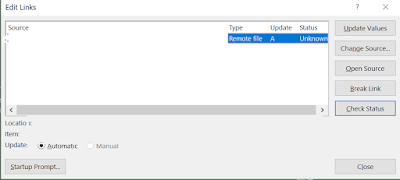
I was asked to look at an Excel sheet that was giving an error stating that an external connection could not be established. Excel online was stating that there was a link in it and so did Excel. That was the easy part, the hard part was finding the external connection and removing it. Excel (desktop) will warn you of any link that cannot be established, and Excel will ask you what to do with the error. You can do a few things (see image below) Edit links options   Everyone would normally choose "break link" and let the problem be fixed, however Excel doesn't allow this. Excel won't state why not or where the reference is but   it won' t remove it either. So how to go about finding this link and removing it? Below I have put my questions I asked myself and the steps I took to see if the link was there. In which worksheet is the problem? The answer to this question is pretty simple, remove the worksheets one by one. Excel shows in the info if there...

Editing metadata without adjusting modified date

Image
Editing meta-data is something you might want to do during the use of a library. However if you adjust meta-data you also adjust the modified date. This you don't want because you don't need people to know that you adjusted something, that's confusing. A great solution for this is using the export to Excel feature in Sharegate to adjust the metadata. First you click on the icon Excel in the top left corner of the tool  Export selection to Excel to export the data into Excel Adjust the meta-data in Excel  Using the Excel button Import the data from Excel Sharegate wil adjust the metadata but not the modify date, very cool feature!

Why labeling data is the way to go

Security is /has been booming for a while now. Everywhere you read about the amount of data being leaked. Now just yester day a  contractor named  Deep Root Analytics put a database online with 198 million potential voters open to download for the public on an Amazon S3 storage server. Well that person will have the worst day of his or her life.  Is this an uncommon thing? Well no, people are leaving data everywhere. We are very sloppy with our or the data of someone else. USB sticks, phone or laptop stolen, e-mails with data, We dump data everywhere and it's scary. In this article I'm going to talk about what my solution would be to prevent any harm being done after a data breach. Methods Let's start by just going through some possible solutions. Not just talking about the data itself but also the identity and the devices that a company uses. Lost or stolen credentials Try using Multi factor authentication (MFA) to enhance the security of the identity. You cou...